

Key Takeaways
- Missed calls are one of the biggest sources of lost cases, especially after 5 p.m. and on weekends.
- AI should handle routine intake tasks. Attorneys and staff should handle case evaluation, fees, and callers in crisis.
- An AI intake agent must never give legal advice or suggest a caller has a strong case.
- Warm scripting, clear handoff rules, and transparency about the AI keep intake personal.
- Connected tools for fax, video, and team messaging turn a single call into a complete intake workflow.
- Conversational AI replaces rigid phone menus, so callers can describe their situation in their own words.
- Tracking answer rates, booking rates, and first call resolution shows exactly where intake is winning or losing clients.
What Is Client Intake Automation for Law Firms?
Client intake automation is the use of AI powered phone technology to manage the first conversation between a potential client and a law firm. Instead of sending calls to voicemail or a phone menu, an AI voice agent speaks with the caller in natural language, gathers basic case information, and schedules a consultation.
A typical automated intake call covers:
- A greeting in the firm’s name
- The type of legal matter
- Key facts such as the incident date, location, and county
- Whether the caller already has an attorney
- Names of opposing parties for a conflict check
- Contact details
- A booked consultation and a confirmation text or email
Why Do Law Firms Lose Clients on the First Call?
Law firms lose potential clients on the first call mainly because nobody answers. People with legal problems usually call several firms, and the first firm that responds with confidence often gets the case.
Picture a woman sitting outside an urgent care clinic at 6:40 on a Tuesday evening. Someone ran a red light and hit her car an hour ago. She calls a personal injury firm and hears a voicemail greeting saying the office closed at five. She hangs up and calls the next firm on her list.
The first call decides three things for the caller:
- Speed: Did someone answer right away?
- Clarity: Does this firm handle my kind of case, and what happens next?
- Empathy: Did I feel heard, or rushed?
Traditional intake struggles with all three. Receptionists take breaks, paralegals get pulled into deadlines, and evenings go to voicemail.
What Should AI Handle in Legal Intake, and What Should Humans Handle?
AI should handle the repetitive, predictable parts of intake. Humans should handle anything that calls for legal judgment, fee discussions, or emotional support during a crisis.
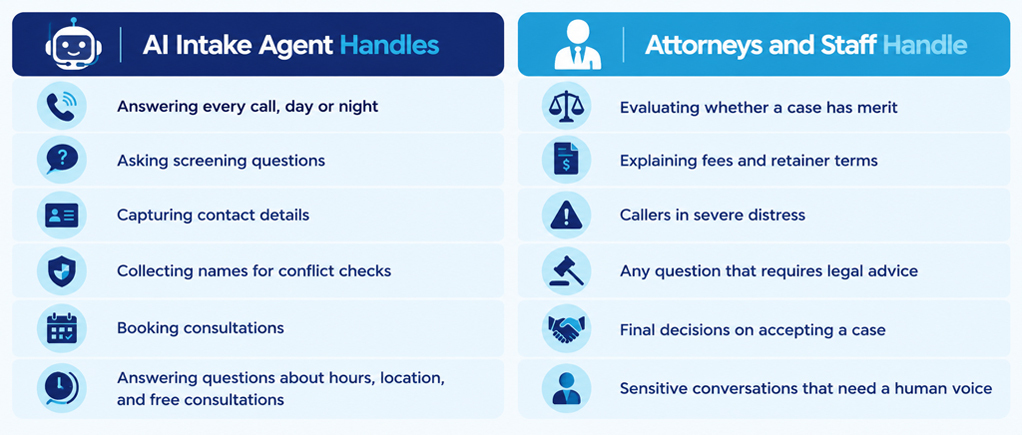
Can an AI intake agent give legal advice? No. An AI intake agent should never tell a caller whether they have a good case or what they should do legally. Doing so can raise unauthorized practice concerns and may imply an attorney client relationship before conflicts are checked. A well designed agent redirects with a line like, “That’s a great question for one of our attorneys. Let me get you on their calendar.”
How Do You Keep the Personal Touch in Automated Intake?
You keep the personal touch by scripting the AI to sound like your best receptionist, acknowledging the caller’s situation before asking questions, and giving specific next steps instead of vague promises.
Model the script on your top performer. Record how your best intake person greets callers, phrases sensitive questions, and responds when someone becomes emotional. Build your AI script from that language.
Ask one question at a time. Rapid fire questions feel mechanical. Let callers tell their story, then collect the details naturally.
Acknowledge before asking. If a caller says, “My father passed away last month and my brother is trying to sell the house,” the AI should respond with, “I’m very sorry about your father. That’s a lot to handle at once,” before asking which county the property is in.
Customize by practice area. A caller whose son was just arrested needs to hear right away that the firm handles bail hearings. An estate planning caller has no urgency at all. Separate flows for each practice area keep every call relevant.
Offer bilingual intake. In communities with large Spanish speaking populations, bilingual AI intake can reach clients that competing firms overlook.
Make promises specific. “An attorney will call you tomorrow between 9 and 11 a.m.” builds more trust than “Someone will reach out soon.”
Be transparent. Let callers know they are speaking with the firm’s virtual assistant and that a person is available on request. Most people are comfortable with AI as long as it’s honest and helpful.
When Should an AI Intake Call Transfer to a Human?
An AI intake call should transfer to a human when the caller asks for a person, sounds highly distressed, mentions a safety concern, has an urgent deadline, or seems confused after a couple of attempts.
Common transfer triggers include:
- A request to speak with someone directly
- A caller currently in custody or with a court date this week
- Mentions of violence, threats, or immediate danger
- Repeated confusion or frustration
The handoff must carry full context. Modern Business Phone Systems pass the caller’s name, case type, and conversation summary along with the transfer, so the caller never has to repeat their story. For after hours matters, the system can text a summary to the attorney on call, who decides what needs attention that night.
How Does Intake Automation Connect to the Rest of a Law Firm’s Workflow?
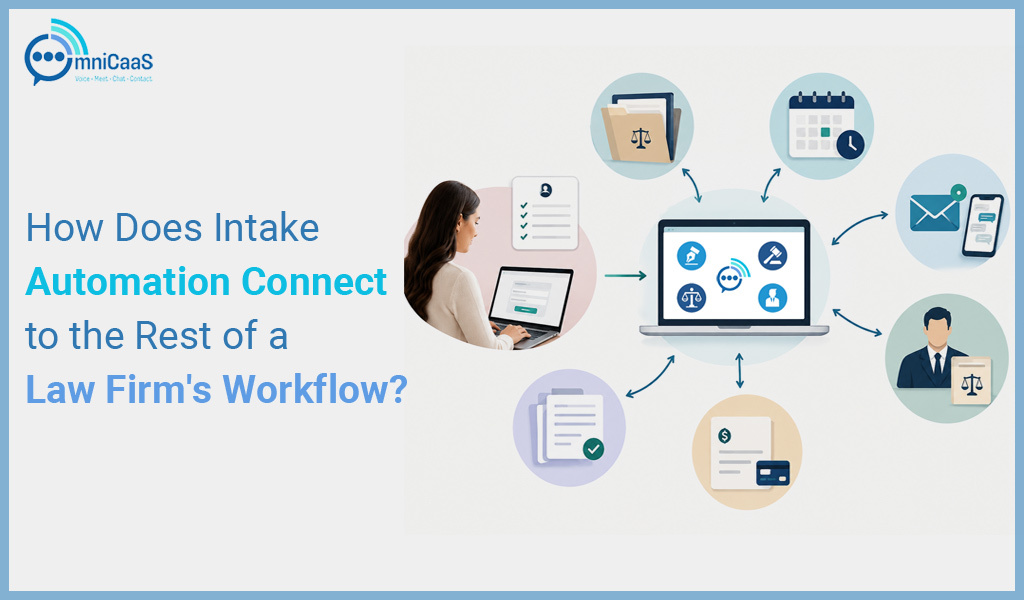
Intake automation works best when it connects directly to document handling, team messaging, video consultations, and case management software. Each connection removes a manual step where leads can slip through.
Documents by fax. Hospitals, insurers, courts, and many older clients still send records by fax. Fax to Email Communication Software delivers police reports and medical records straight to your inbox instead of leaving them on a machine in the back office.
Team alerts. When a strong lead comes in, the right attorney should know right away. A Microsoft Teams Integration puts intake alerts, calls, and messages inside the app your staff already uses all day.
Remote consultations. Parents, injured clients, and people in rural areas often prefer to meet online. Web & Video Collaboration tools let the AI book a secure video consultation during the intake call, with document sharing built in.
Case management. New contact records should flow automatically into practice management platforms like Clio, MyCase, or Filevine to eliminate double entry.
What Metrics Should Law Firms Track for Intake?
Law firms should track call volume by hour, answer rate, consultation booking rate, consultation to client conversion rate, and where callers drop off during the conversation.
Many firms find that a large share of their calls arrive after hours, which shows exactly how many cases voicemail was costing them. Contact Center Tools such as call recording, transcription, and sentiment analysis reveal how each conversation actually went, so you can spot the question that causes hang ups or the script that runs too long.
Another useful measure is how often a caller’s needs are fully met in a single conversation. When a caller gets answers, a booked consultation, and a confirmation without calling back, satisfaction rises and staff workload falls. Our breakdown of how AI Drives Better First Call Resolution explains why this metric is such a strong signal of intake health.
What Mistakes Should Law Firms Avoid When Automating Intake?
The most common mistakes are relying on rigid phone menus, collecting too much information on the first call, overlooking confidentiality, and never updating the intake script.
Rigid phone trees. “Press 1 for personal injury, press 2 for family law” is not real automation. Distressed callers don’t want to navigate menus. Conversational AI that understands natural speech offers a far better experience, and our guide on VoIP vs AI Communication explains how the two approaches differ.
Overloading the first call. Collect enough to screen, run conflicts, and book the consultation. Leave the detailed case review to the attorney.
Weak confidentiality practices. Intake calls contain sensitive personal details. Confirm that your provider encrypts recordings and data, limits access to authorized staff, and meets the standards your state bar expects. Review your jurisdiction’s ethics opinions on cloud and technology vendors.
Set it and forget it. Listen to a few recorded calls every week and refine the script as practice areas, questions, and caller needs change.
The Personal Touch Was Never About Who Picks Up
Go back to the woman outside urgent care. At 6:40 that evening, she didn’t necessarily need a human voice. She needed someone to answer, listen, confirm the firm handles cases like hers, and give her a specific time to speak with an attorney. She needed to feel her call mattered.
A thoughtfully designed AI intake system does that every time, at any hour. It also frees your staff to focus on the conversations that truly need a person: the grieving widow, the frightened defendant, the parent fighting for custody. Automation doesn’t replace the personal touch. It protects it.
If your firm is missing calls after hours or your front desk is stretched thin, OmniCaas can help you build an intake system that answers every call, captures every lead, and hands off to your team with full context. Book a demo to hear how an AI intake agent would sound for your practice.

Post a Comment