

Key Takeaways
- Teams Phone adds real PBX calling to the Teams app your staff already uses every day.
- You need two layers to make it work: a Teams Phone license and an actual PSTN connection.
- Microsoft Calling Plans are the simplest route, while Operator Connect and Direct Routing give you more control.
- Start number porting early, since it’s the step most likely to push back your go-live date.
- US businesses must configure E911 to meet Kari’s Law and RAY BAUM’S Act requirements.
- Auto attendants, call queues, and voicemail transcription cover nearly everything an old PBX did.
- Teams doesn’t handle fax, so plan for cloud fax before the analog lines get disconnected.
- MFA and blocked international dialing are your best defense against costly toll fraud.
Your team already spends most of the day inside Microsoft Teams. They chat there, share files there, and jump on video calls there. Then a customer calls the main line, and suddenly everyone is reaching for a separate desk phone or a clunky softphone app that doesn’t talk to anything else.
It doesn’t have to work that way. With the right licenses and a connection to the public phone network, Teams can make and receive regular phone calls, run an auto attendant, route callers through queues, and handle voicemail. In other words, it can replace the PBX sitting in your server closet.
This guide walks through how US businesses actually make that switch: what to buy, how to connect it, how to set it up, and where companies usually trip up along the way.
What “Teams Phone” Really Means
Out of the box, Teams handles calls between Teams users. You can ring a coworker, start a video meeting, or call someone at a partner company who also uses Teams. What you can’t do is dial a regular 10-digit number or give a customer a direct line to reach you.
Teams Phone is the piece that closes that gap. It’s Microsoft’s cloud calling platform, and it adds PBX features to the Teams client your people already know. Once it’s turned on and connected to the public switched telephone network (PSTN), a sales rep can take a call from a prospect in Ohio on her laptop, transfer it to a colleague’s cell phone, and drop the voicemail transcript into a chat thread.
Think of it as two layers. The first is the calling feature set, which comes from the Teams Phone license. The second is the dial tone itself, meaning actual phone numbers and a route out to the PSTN. You need both. A lot of first-time buyers get the license, assign it, and then wonder why nobody can call out. Usually it’s because the second layer was never set up.
Modern Business Phone Systems have been heading this direction for years, folding voice into the same app as messaging and meetings. Teams just happens to be the app most offices already pay for.
Get the Licensing Right First
Licensing is where most of the confusion lives, so sort it out before anything else.
Every user who needs to make or take outside calls needs a Teams Phone license. Some higher-tier Microsoft 365 enterprise plans, such as E5, already include it. Most small and midsize businesses on Business Basic, Standard, or Premium plans will need to add it on per user.
A few other licenses matter too:
- Resource account licenses for auto attendants and call queues. Microsoft offers these at no extra cost, but you still have to assign them.
- Shared device licenses for lobby phones, break room phones, and warehouse handsets that aren’t tied to one person.
- Teams Rooms licenses if you’re putting calling into conference rooms.
- A calling plan or carrier service for the actual phone numbers, which brings us to the next decision.
One tip: count your users by how they actually work, not by headcount. A receptionist, a call center agent, and a back-office accountant who never picks up the phone don’t all need the same setup. Licensing only the people who make external calls can keep the monthly bill noticeably lower.
Pick How You’ll Connect to the Phone Network
This is the biggest choice you’ll make. Teams gives you three main paths to the PSTN, and each one fits a different kind of business.
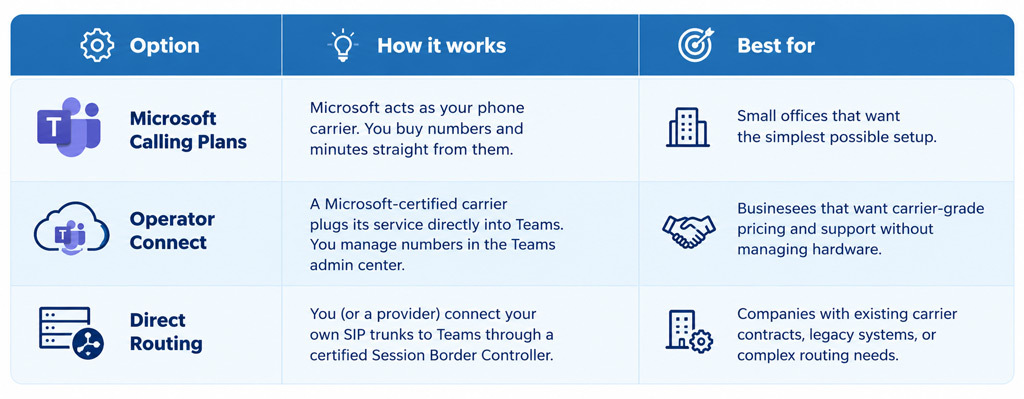
Calling Plans are easy, but you give up flexibility. Pricing and international rates are fixed, and porting numbers in can feel slow.
Operator Connect hits a sweet spot for many US companies. The carrier handles the heavy lifting, rates are often better, and you still get a clean admin experience.
Direct Routing takes more work. In exchange, you can keep your current carrier, connect old analog devices like fax lines or overhead paging, and run hybrid setups where some sites stay on an on-premises PBX during migration. Plenty of managed providers will host the SBC for you, so “more work” doesn’t have to mean your work.
Setting It Up, Step by Step
The exact clicks depend on which connection method you chose, but the overall flow looks the same for almost everyone.
- Audit what you have today. List every phone number, extension, hunt group, and fax line. Note who answers what, and when. You’ll be surprised how many “mystery numbers” turn up on an old carrier bill.
- Check your network. Voice is less forgiving than email. Run Microsoft’s network assessment tools and make sure you have enough bandwidth and solid Quality of Service settings at each site.
- Assign licenses. Give Teams Phone licenses to the right users in the Microsoft 365 admin center, plus resource account licenses for any auto attendants or queues.
- Get your numbers. Order new ones or start porting existing numbers from your current carrier. Port early. It’s the step most likely to delay your go-live date.
- Set up emergency calling. US law (Kari’s Law and RAY BAUM’S Act) requires direct 911 dialing and an accurate dispatchable location. Add your emergency addresses in the Teams admin center and configure dynamic emergency calling for remote and hybrid staff.
- Build your call flows. Create auto attendants, call queues, business hours, and holiday schedules. Record your greetings.
- Configure policies. Calling policies control voicemail, call forwarding, and recording. Voice routing policies matter most if you’re on Direct Routing.
- Pilot, then roll out. Move one department first, fix what breaks, and then migrate everyone else in waves.
For a deeper look at preparing your team for the change, this Guide to Microsoft Teams Integration covers the people side of the rollout as well as the technical one.
The Features That Make It Feel Like a Real Phone System

Once calls are flowing, the fun part starts. Teams Phone covers nearly everything a traditional PBX did, and a few things it never could.
Auto attendants greet callers and send them to the right place. “Press 1 for sales, 2 for support” works exactly as you’d expect, and you can add speech recognition so callers just say the department name.
Call queues spread incoming calls across a group of agents. You can choose round robin, longest idle, or attendant routing, and set overflow rules for when the line gets busy.
Voicemail with transcription lands in Outlook and the Teams app. Your staff can skim a message in a meeting instead of stepping out to listen.
Then there are the everyday touches people miss once they’re gone:
- Call park and pickup, so a call can be held and grabbed from any device
- Delegation, letting an assistant answer and place calls for an executive
- Shared line appearance for front desks and support teams
- Call transfers between laptop, mobile app, and desk phone without hanging up
- Busy on busy, which sends a second caller to voicemail instead of interrupting a live call
Hardware is optional. Certified desk phones from Poly, Yealink, and AudioCodes run the Teams interface natively. Many companies keep a handful for reception and conference rooms while everyone else uses a headset.
The real payoff of Microsoft Teams Integration shows up in context. When a call comes in, the caller’s name, past chats, and shared files can sit right next to the call window.
Don’t Forget Fax, Video, and the Rest of the Stack
Here’s something that catches people off guard. Teams doesn’t do fax.
That might sound like a non-issue until you remember that US healthcare offices, law firms, insurance agencies, and real estate brokers still send and receive faxes every single day. Some of those documents carry legal or compliance weight, so “just email it” isn’t always an option.
When the old PBX goes away, the analog fax lines often go with it. The cleanest fix is cloud fax. Good Fax to Email Communication Software lets you keep your existing fax numbers and receive incoming faxes as PDFs in your inbox. Sending is just as easy, straight from email or a web portal, with no machine or dedicated line required.
Video is the other piece to think about. Teams meetings are strong for internal work, but some businesses need more: webinars with registration, large town halls, customer-facing rooms that don’t require guests to install anything, or interoperability with older video conferencing hardware. Pairing Teams calling with dedicated Web & Video Collaboration tools fills those gaps without forcing everyone to learn a second app for daily use.
The goal is one communications setup with no forgotten corners. Plan for these pieces during the audit, not after the old system has been unplugged.
Lock Down Security Before Go-Live
Moving your phones to the cloud means your phone system now lives inside your Microsoft 365 tenant. That’s good news, because it inherits the identity and compliance controls you already use. It also means a compromised account can now make phone calls.
Toll fraud is a real problem. Attackers who get into a single user account or a poorly secured SBC can rack up thousands of dollars in international calls over one weekend. A few habits go a long way:
- Require multi-factor authentication for every user, with no exceptions for executives
- Block international dialing by default and allow it only for people who need it
- Turn on alerts for unusual call volume or calls to high-risk countries
- Keep SBC firmware patched and restrict SIP traffic to known IP addresses if you use Direct Routing
- Review call recording and retention settings against your industry rules, such as HIPAA or FINRA
Whoever administers the system should also get comfortable with the broader VoIP Security Best Practices that apply to any internet-based phone system, from encryption to network segmentation. Teams encrypts media and signaling by default, but the weakest link is usually a password, not a protocol.
Mistakes We See Most Often
Most rollouts that go sideways fail for boring reasons. Number porting gets started too late. Wi-Fi in the warehouse can’t handle voice. Nobody tells the front desk how transfers work now. Or the main number goes live with no after-hours greeting, and customers hear dead air on Saturday.
Training is the cheapest fix. Fifteen minutes showing people how to answer, transfer, park, and check voicemail prevents weeks of help desk tickets.
Where to Go From Here
Turning Teams into your full business phone system is very doable, even for a small IT team. Get licensing sorted, choose the PSTN connection that fits your size, build call flows that mirror how customers actually reach you, and cover fax, video, and security before you cut over.
If you’d rather not run the project alone, a provider that handles Operator Connect or Direct Routing can take on the porting, SBC management, and E911 setup for you. Either way, your team gets one app for every conversation, and that’s a change people notice on day one.
Post a Comment